
Welcome To Day Five!
Challenge Day Friday- Wear Gear From Your Favorite Sport TeamWeek One, Six Hour Program
Hey, counselors and instructors! It’s Challenge Day Friday!! Get ready for an AMAZING day with your campers!
ALL Folders
Class Connect should already be completed with campers for this session.
Teacher Code for this session: _____________________________
Campers log into: Code.makewonder.com
Instructors should review the calendar for the day to ensure they are dressed to match the theme of the day.
Welcome Campers: 15 minutes
- Instructor Introduction- How did you all make out with your “Campified Home Challenges Last Night?
- Campers Respond to questions.
- If time permits have a camper share their finished project.
- Challenge Day! Compliment their participation and their gear from their favorite team.
Log On Help:
- Ask if any camper had difficulty logging in to Zoom.
- Review logging in to the simulator. Address any issues.
Review from yesterday’s session
- Yesterday we learned many things. We learned how to use all the Variables blocks including the set, change, if, if/else, do, and repeat blocks
- We were able to drag and drop command blocks from each folder to create a program that you wanted Dash to complete.
- Today we will reinforce our learning of ALL commands so we can master all that Dash can do.
Review ALL Folders:
- Yesterday we used all of the blocks in the Variable Folder. Today we are going to review all of the folders.
- Review all of the commands in each folder.
- Q & A time.
Campers Independent Practice of Control Folder
Dash’s Neighborhood Adventure
Introduction:
Today is the final challenge for the week! You will use everything you have learned to create your own story with Dash and navigate “Dash’s Neighborhood” Please write a story that takes Dash on an adventure through the Neighborhood. Be creative on what Dash is doing, what problems Dash needs to solve, and how Dash fits into the story in this Neighborhood.
Teacher Demonstration:
- Explain the story-making process (5 step process below)
- Explain what blocks must be included (list below)
- Review using Blockly to create algorithm by going through all required tabs
- Model using the “extra” tabs to enhance the story
- Review how to record voice on the simulator

Extended Activity:
During your code Dash MUST use commands from the following tabs:
- Drive
- Look
- Light
- Sound
- Control
- Variables
In order to enhance your code and make it coincide with the story, use any and all blocks available in Blocky that will make your code even better! These may include Animations or Variables. Your story must bring Dash around the Neighborhood and have Dash “interact” with at least three components of the Neighborhood – for example, drive up to one of the houses and complete a task or do an action. Your story can either be read to the class while your code is working in the background OR you can record your voice using the “My Sounds” block on Blockly and have the story told throughout your code. You will be sharing your story with the class at the end of the day. Be creative and most importantly, HAVE FUN!

How to write a story:
Step 1: Brainstorm
- Think of and write down multiple ideas for what your story may include. Who are the characters? Where are they?
Step 2: Choose a topic
- Select ONE idea from the brainstorming session to move forward with
- Choose characters
- Location
- Plot
Step 3: Write a first draft and revise
- Write a first draft
- See if it works with your code
- What else can you implement?
- How can you make it better?
- Make changes
Step 4: Finalize story and code
- Practice your story and your code to ensure they work together
- Practice reading story out loud OR record story on Blockly
Step 5: Present to the class

Wrap up 45 minutes
Instructor to review appropriate behavior when campers are sharing.
- When we are sharing, we are only using positive words.
- Instructor gives an example: “John, I really liked how you were able to use all the color lights in your program.”
- We should feel good after someone comments on our work.
- Ask who would like to share their program with the group? (instructor selects who will share first)
- If there is time remaining, campers can continue with the puzzles from yesterday. Click the 3 orange lines in the upper left hand corner and select puzzles. Remind campers that you can monitor their progress while they are completing the puzzles.
Lunch: One Hour
Welcome Back Campers 10 minutes
- Instructors welcome back campers from lunch.
- If you need to complete your morning activity you can also work on perfecting that.
- “Campers this 2nd part of our day is mainly you creating your programs and exploring what we have learned today.”
- “Also putting what we learned today together with what you have been learning with Blockly. “
- “I will introduce you to the activity and you will start to design your program using the folders that we focused on yesterday and today.”
Instructors Introduce Independent Activity 50 minutes
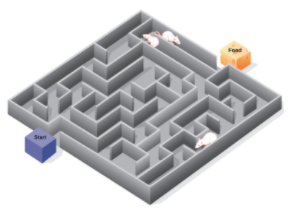
Campers, this afternoon you are going to work on your final camp activity. You are going to use all of the folders and command blocks that you have worked with this past week. When at camp there are so many fun activities that the campers participate in. One of the final activities is Color War. Dash is going to be running in the final Color War Run. Here is where the baton is passed to the next camper and they make it to the next person and so on. Dash is handed the baton and he has to run past all of the campers cheering him on. Along his way he is going to stop and participate in a maze run. You will be designing a maze that includes several turns at different angles and some obstacles in his way. Design a maze (example below) and program Dash making his way through it. Include lights, sounds, animations, repeat tabs and other blocks you have worked with.
Remind campers to test their program to ensure it is following the maze that they created on paper. Instructors will check in with all campers to make sure they are working well and if assistance is needed, you can give it.
Instructor Explains the Talent Show Home Challenge Activity Directions
Day Five: Talent Show – Home Challenge
Dash has come to the end of the camp week and will be showing off his talent in the Camp Talent Show. Campers will use the simulator to create a program that will incorporate the Control Tab, Drive Tab, Light and Sound Tab along with functions and variables. Dash is going to play on the water pad at camp to cool down. Campers will create a program in Blockly that includes the following:
- Dash needs to include many different talents within his performance.
- Be creative with your programming and incorporate all of the coding blocks from Blockly that you have learned this week.
- Use no less than 10 blocks within your program.
Make sure you save your program and title it Talent Show. Remember if something is not looking right with your program, review the directions and problem solve while looking within your program. You may need to change a block or two in order for Dash to move the way you want him to. Good Luck!
More at home extension activities:
- Missions 1-5 for age group
- Challenge Cards
- Design Solutions for Home