
Welcome To Day Two!
Wild Wild West DayWeek Two, Three Hour Program

Hey, counselors and instructors! We hope you have on your western duds and are ready for an AMAZING day with your campers!
Class Connect should already be completed with campers names entered prior to the class starting.
Campers log into: Code.makewonder.com
Teacher Code for this session: __________________________
Instructors should review the calendar for the day to ensure they are dressed to match the theme of the day.

Welcome Campers: 15 minutes
- Instructors should be wearing wild west gear to go along with the theme of the day.
- Wild Wild West Day! Compliment their participation.
- Ask, “How did everyone do with the home challenge last night?”
- Did anyone run into any struggles as you were completing the bowling activity?
- Instructors will address as needed.
Log On Help: 15 minutes
- Review the basics of logging in and address any issues the campers may have had.
- Ask if any camper had difficulty logging in to Zoom.
- Address any issues with logging in to the virtual simulator.
- Review how to toggle back and forth from Zoom to Simulator.
- Review how campers will share their screen. Make sure that you have allowed all participants to share their screens.

Instructor Reviews Controls Folder: 20 minutes
- Share all of the command blocks in this folder:
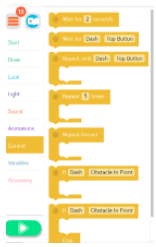
- Model how to open each command block and change parameters.
- Wait for ___ seconds command block. Campers can modify the amount of time Dash will wait before doing any other command.
- Wait for Dash command block. Campers can put a different block inside this command block, and the command will happen until whatever they set happens. It is set with Wait for Dash -Top Button. So, Dash will wait to continue a command until that top button is pushed. A button will appear under the simulator window.
- Repeat until Dash – Top Button Command Block- Whatever command the camper puts inside this block will repeat until the next activity occurs. It comes set to Top Button. If a camper selects drive forward 50 cm that will repeat until the top button is pushed. A button will appear under the simulator window in a box labeled “Robot Inputs”.
- Repeat command block. Whatever command the camper places inside the repeat command block will repeat however many times they select. Model how to change the number of times it repeats.
- Repeat Forever Block- Whatever command is placed within this command block will repeat forever. Nothing after it will happen.
- If Dash- Obstacles In Front Command Block. Whatever is placed inside this block will be what Dash does if there is an obstacle in front of him. Model how you can change the parameters within that command block.
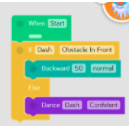
- If Dash- Obstacles in Front-Else. Whatever is placed in the top part of this command block will be substituted for what is placed in the bottom section of the command block. For example: If Dash has an obstacle in front instead of him driving backwards 50 cm he will do a silly dance instead.
Q & A time.

Explain lasso the goat activity: 5 minutes
- Have Dash light up Blue
- Drive to the goat
- In the Wild West, cowboys and cowgirls lasso the animals in order to train them
- Lasso the goat by driving around the goat until Dash’s top button is pressed – Hint: use the repeat block
- Have Dash wait 1 second
- Dash’s lights should change to red
- Have Dash celebrate with an animation
- Name it Lasso
Complete lasso the goat activity – 15 minutes

Explain Find all the rattlesnakes activity: 5 minutes
- Have Dash light up green
- Drive to all of the green buildings in the simulator and find the rattlesnakes
- In order to find the rattlesnakes, Dash must slither around in front of each of the green buildings (there are three green buildings)
- Create a program that had Dash drive to each green building, slither in front of the building using any blocks from the control tab, then move on to the next building and do the same thing for all three buildings
- Name it Rattlesnakes
Complete the Find the Rattlesnakes activity: 20 minutes

Explain make a campfire activity: 5 minutes
- In the Wild West, people had to make campfires for light and to stay warm
- Have Dash build a campfire
- Drive to the battery symbol – this is where the fire will be made
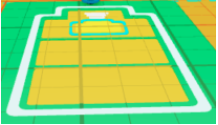
- In order to lay the logs down for the fire, have Dash pace back and forth along the battery 3 times (use the repeat blick)
- In order to light the fire, have Dash’s lights turn red
- Have Dash tell a quick story around the fire
- Record your own voice telling a campfire story
- Have Dash roast marshmallows
- This can be done by having Dash drive to the front of the battery, turn lights green, wait 2 seconds, drive to the back of the battery, turn lights orange, wait two seconds.
- Repeat that for as many marshmallows as Dash would like to have
- Name it Campfire
Complete Make a Campfire activity: 20 minutes

Explain final activity to put lasso the goat, find all the rattlesnakes, and make a campfire activities into one: 5 minutes
- Make one big program putting it all together
- Name it Wild West
Complete final activity: 10 minutes
Wrap up activity: 45 minutes
Instructor to review appropriate behavior when campers are sharing.
- When we are sharing, we are only using positive words.
- Instructor gives an example: “John, I really liked how you were able to use all the color lights in your program.”
- We should feel good after someone comments on our work.
- Ask who would like to share their program with the group? (instructor selects who will share first)
- When all campers are done, have each group present their program to the class
- Introduce themselves
- Explain what Dash will be doing during the execution of the program that they wrote
- Show the class how Dash executes their program
- If there is time remaining, campers can continue with the puzzles from yesterday. Click the 3 orange lines in the upper left hand corner and select puzzles. Remind campers that you can monitor their progress while they are completing the puzzles.
- After certain campers have shared their program, the instructor will go over the instructions for the home challenge.
Day Two- Kickball Game- Home Challenge
Campers will spend a day at the mound with Dash. You will use the simulator to create a program that will incorporate the Start, Drive, Lights, Sound, Animations, and Model Repeat Tabs. What better way to spend the day, than watching Dash at the Camp Kickball World Series. Campers will create a program in Blockly that includes the following:

- Dash will start at the circle. He wants to get the crowd excited for the game that is about to start. Start your program by creating that excitement. How will Dash show that to the crowd?
- Next Dash is focused on the kickball that will be heading his way. He paces back and forth to release his tension.
- Dash looks straight ahead, then to the left and right to see if he is ready to kick.
- Finally dash backs up and with all of this speed runs up to kick the ball.
- It is a great far kick. Dash starts to run the bases.
- On his way to 1st base it is about 210 cm from home plate.
- He turns to look at 2nd base and feels he can continue to run. He needs to change his speed to make sure he will be able to get to 2nd base quickly. Also he makes sounds of an engine as he is starting to run.
- He runs and on his way he says, “Bye”.
- He arrives at 2nd base and looks right and left.
- He takes off again, heading to 3rd base. His lights change to Green, because he is ready to GO!
- He runs 210 cm to 3rd base and when he arrives at 3rd he does a “silly dance”.
- He decides he will run backwards 210cm to home plate so he can watch the outfielders carefully.
- As he takes off for home plate, you can hear the sound of a, “car tire squeal”.
- Dash takes off for home plate and when Dash gets there you hear a “laugh”.
- Dash then looks at the crowd and says, “This is only the beginning!”
Make sure that when you have completed this challenge you save your work as Kickball World Series. Tomorrow you will have the opportunity to share your program with the group. Remember if something is not looking right with your program, review the directions and problem solve while looking within your program. You may need to change a block or two in order for Dash to move the way you want him to. Good Luck!
Additional Home Activities: