
Code & Go Activity Six
This class will cover the following topics:
- Understand what a maze is
- How to create a maze
- Program Colby to go through a maze
Materials needed:
- Pictures of different mazes
- Painter’s tape
- Colby robot
- Green maze grids
- Maze cards
- Purple maze walls
- Orange tunnels
- Yellow cheese
The teacher should have a discussion about what a maze is and show the class different pictures about mazes. “A maze is a complex system of passages or paths between walls or hedges and is designed to confuse people who try to find their way through it”. In order to have the children get a first hand feeling about a maze the teacher can set up a simple maze in the class and have each child walk through. A very simple way to create a maze is to use painter’s tape and create a maze on the floor. Make sure it’s wide enough, so that the children have enough room to walk through. Music can be playing to add fun and excitement to this experience.
Have enough maze designs already on the floor at a separate part of the room, so each pair of children can get to program their mouse robot to go through each maze. The mazes can be a straight with a left or right turn. The maze should not be longer than 1 foot – 1 ½ foot in length. HINT: The mouse robot moves the same forward or backward distance for each press of the forward or backward command. Make sure it has enough room for the mouse robot to turn with the number of forward commands that have been used. Have different pairs start at one maze and rotate through all of the ones on the floor. Make sure to have a starting point where the mouse robot will be placed each time they start their program. The blue painter’s tape can be used for this. In this way they can better calculate the distance needed to travel before programming their next command. This exercise will have the children test and retest their ideas about how many times they have to press a command on the mouse robot to successfully conquer the maze challenge. Make sure each child gets a chance to push the buttons to program their mouse robot.
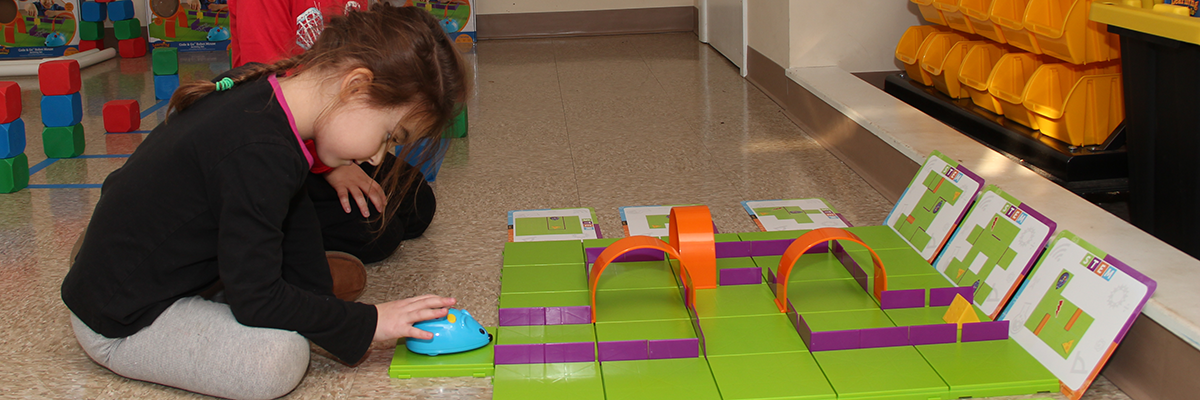
Once the children understand what a maze is have them use the green maze grids and assemble the square on maze card 1. The children should be working in pairs during this activity to continue collaborative teamwork and communication skills. Each pair should get one complete activity set to use during this activity. Have them duplicate the purple walls and then place the yellow cheese on the maze as indicated on maze card 1. Finally, have them program their mouse robot to reach the cheese. Once the nose of the mouse robot touches the flat part of the cheese it’s eyes light up. This lesson is the foundation for all the other maze cards to be used that come with this kit.