
Welcome To Day Three!
Wear your Camp ColorsWeek One, Six Hour Program
Hey, counselors and instructors! We hope you’re wearing your camp colors and are ready for an AMAZING day with your campers!
Control Folder
Class Connect should already be completed with campers for this session.
Teacher Code for this session: _____________________________
Campers log into: Code.makewonder.com
Instructors should review the calendar for the day to ensure they are dressed to match the theme of the day.
Welcome Campers: 15 minutes
- Instructor Introduction- How did you all make out with your “Campified Home Challenges Last Night?
- Campers Respond to questions.
- If time permits have a camper share their finished project.
- Camp Color Day! Compliment their participation.
Log On Help:
- Ask if any camper had difficulty logging in to Zoom.
- Review logging in to the simulator. Address any issues.
Review from yesterday’s session
- Yesterday we learned many things. We learned how to add sound and animation to our program as well as making Dash repeat certain commands.
- We were able to drag and drop command blocks from each folder to create a program that you wanted Dash to complete.
- You also learned how to personalize your program by recording your own voice onto Dash. Super Cool!
- Today we will continue with learning different commands so we can have Dash do more.

Introduce Control Folder:
- Yesterday we used the repeat block in the Control Folder, but today we are going to learn all of the other command blocks within this folder as well.
- Share all of the command blocks in this folder:
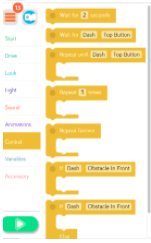
- Model how to open each command block and change parameters.
- Wait for ___ seconds command block. Campers can modify the amount of time Dash will wait before doing any other command.
- Wait for Dash command block. Campers can put a different block inside this command block, and the command will happen until whatever they set happens. It is set with Wait for Dash -Top Button. So, Dash will wait to continue a command until that top button is pushed. A button will appear under the simulator window.
- Repeat until Dash – Top Button Command Block- Whatever command the camper puts inside this block will repeat until the next activity occurs. It comes set to Top Button. If a camper selects drive forward 50 cm that will repeat until the top button is pushed. A button will appear under the simulator window in a box labeled “Robot Inputs”.
- Repeat command block. Whatever command the camper places inside the repeat command block will repeat however many times they select. Model how to change the number of times it repeats.
- Repeat Forever Block- Whatever command is placed within this command block will repeat forever. Nothing after it will happen.
- If Dash- Obstacles In Front Command Block. Whatever is placed inside this block will be what Dash does if there is an obstacle in front of him. Model how you can change the parameters within that command block.
- If Dash- Obstacles in Front-Else. Whatever is placed in the top part of this command block will be substituted for what is placed in the bottom section of the command block. For example: If Dash has an obstacle in front instead of him driving backwards 50 cm he will do a silly dance instead.

- Q & A time

Campers Independent Practice of Control Folder
- Campers are going to be released to practice what was taught today.
- Imagine you are at summer camp. Today Dash is competing in the Indy 400. This is a car race where the race cars drive in a big oval many times. Think about a NASCAR race, how the cars do the same thing over and over and over again. However the driver must always be looking around to check their mirrors, make sure no cars are going to pass them, and make sure they do not have a car accident. When you are creating your program include command blocks that will create a day at the Camp Indy 400.
- Here are the guidelines for their practice.
- Create a program where you are using command blocks from all of the folders we worked in yesterday and today. Drive, Look, Light, Sound, Animation, Repeat, Wait, If, If/Else.
- Beginners can create a smaller program with fewer blocks.
- Advanced campers can create a more extensive program.
- Make sure the cars wait until the lights change from red, to yellow, to green. Then Dash should drive in a square totalling 400 cm, 10 times. All the while, Dash should be looking around to make sure they are practicing safety and no one is gaining on their tail!
- Instructors should be aware of the time. Campers should have enough time to share as well as being shown the “Campified” Home Challenge.
- Have campers save their program as Indy 400.
Wrap up: 45 minutes
Instructor to review appropriate behavior when campers are sharing.
- When we are sharing, we are only using positive words.
- Instructor gives an example: “John, I really liked how you were able to use all the color lights in your program.”
- We should feel good after someone comments on our work.
- Ask who would like to share their program with the group? (instructor selects who will share first)
- If there is time remaining, campers can continue with the puzzles from yesterday. Click the 3 orange lines in the upper left hand corner and select puzzles. Remind campers that you can monitor their progress while they are completing the puzzles.
Lunch: One Hour

Welcome Back Campers: 10 minutes
- Instructors welcome back campers from lunch.
- Campers this 2nd part of our day is mainly you creating your programs.
- I will introduce you to the activity and you will start to design your program using the folders that we focused on yesterday and today.
Instructors Introduce Independent Activity: 50 minutes
You are spending part of your camp day in Arts & Crafts. The Arts & Crafts instructor wants you to create an underwater habitat. Think of the different parts of an underwater habitat. What could you see? Have campers answer. Dash will need to explore your underwater habitat and make stops along his journey. When Dash stops to explore he needs to show excitement and needs to explain what he sees. Campers, you will need to be the voice of Dash and record what Dash sees throughout the habitat.
Your program should include command blocks from the folders we have worked in and include blocks from the Control Folder. Dash can repeat certain actions by using the blocks within this folder. Be creative when designing your experience.
Campers can draw down on paper if they decide to or they can visualize the underwater habitat as well.
- Instructors must check in with each camper as they are working to make sure that they are moving through the activity and don’t need any assistance. If campers need help ask them to share their screen with you.
- Instructors want to monitor the time. Campers will need time to share their programs.
- Have campers save their program as Underwater.
Wrap up activity – 45 minutes
Instructor to model appropriate behavior when campers are sharing.
- When we are sharing, we are only using positive words.
- Instructor gives an example: “John, I really liked how you were able to use all the color lights in your program.”
- We should feel good after someone comments on our work.
- Ask who would like to share their program with the group? (instructor selects who will share first)
- If there is additional time, campers can complete puzzles.
- Top left corner there are 3 orange lines. Click on that and it will take them to a screen where they can select puzzles. Let them know that the instructors can monitor their progress on the puzzles to make sure that they understand what was taught today.
Instructor Explains the Carnival Day Home Challenge Activity Directions
Day Three: Carnival Day – Home Challenge
Campers will spend a day at the Camp Carnival with Dash. They will use the simulator to create a program that will incorporate the Control Tab, Drive Tab, Light and Sound Tab. Maybe Dash can even have a cotton candy or some popcorn at the Camp Carnival. Campers will create a program in Blockly that includes the following:
- Dash needs to take a look at all the different booths at the Camp Carnival. The Carnival booths are set up in a rectangle shape. Create a program where Dash is traveling around looking at each booth.
- There are 8 booths.4 booths are located on the right side of the carnival, and 4 booths are on the left side of the carnival. Dash has to travel and stop at all 8 booths looking either right or left at the booth.
- When Dash arrives at the last booth he needs to Ta Da!
- Dash now wants to go to the soccer booth and try to win a prize. Dash is so excited he Dances in a square 3 times. Use the Control tab to repeat that movement.
- Dash now asks the person at the booth how to win a prize. Record your voice explaining how Dash can win a prize.
- After Dash hears the rules he needs to travel 150 cms. Using the control tab have Dash move 150 cm.
- When he gets to where he needs to be, Dash then waits 6 seconds. Use the control tab to have Dash wait.
- Dash then moves backwards 90 cm. Use the control tab, have Dash move 90cm.
- Finally Dash wants to get a snack at the carnival. He needs to travel to the other side of the carnival to get some cotton candy. He has to travel 3 sides of the rectangle.
- When he gets to the booth he has to say hi and turn his lights all to blue. That is the color cotton candy he would like. Then Dash says, “Let’s do this”!
- Finally Dash makes it back to the place he started which is 120 cm away.
- Dash had a great and fun day at the Camp Carnival.
Make sure you save your program as the Camp Carnival. Tomorrow you will have the opportunity to share your program with the group. Remember if something is not looking right with your program, review the directions and problem solve while looking within your program. You may need to change a block or two in order for Dash to move the way you want him to. Good Luck!
More at home extension activities:
- Mini Mission 3
- Challenge Cards