
Hey, counselors and instructors! We hope you’re wearing your coolest pajamas and are ready for an AMAZING day with your campers!
Drive/Look/Light Folders
Class Connect should already be completed with campers names entered prior to the class starting.
Campers log into: Code.makewonder.com
Teacher Code for this session: __________________________
Instructors should review the calendar for the day to ensure they are dressed to match the theme of the day.
Each week campers will be working towards completing a Robotic Challenge on Friday. All skills being taught, and independent practice will guide campers to completing the Friday challenge successfully.
Welcome Campers: 15 minutes
- Instructors should be wearing pajamas to go along with the theme of the day.
- Instructor Introduction- Share how excited you are that they are back for a second week of virtual robotics.
- Campers Introduction- Name and grade level. What is one thing you are hoping to be able to do after this week?
- Pajama Day! Compliment their participation.
Log On Help: 15 minutes
- Review the basics of logging in and address any issues the campers may have had.
- Ask if any camper had difficulty logging in to Zoom.
- Address any issues with logging in to the virtual simulator.
- Review how to toggle back and forth from Zoom to Simulator.
- Review how campers will share their screen. Make sure that you have allowed all participants to share their screens.
Review of Drive and Light Folders: 15 minutes
- Instructors should share their screen as they are reviewing what was learned last week.
- During the Week One session you were introduced to the Drive and Light Folders. Today you are going to use those folders and the commands within the folders to be able to change parameters and create a Nested Loop.
- Remember to change the parameters of a command block, you need to select the block you want to use and go into the actual block to change what that block is going to tell Dash to do.
- This is how we did that. (Instructor pulls up the simulator and models how to select the forward block in the Drive Folder and change the distance from 50 cm to 90 cm. Also, change the speed from Normal to Really fast. By changing parameters you are enhancing your program without having to add more blocks.

Campers to Independently Practice Changing Parameters in Drive: 15 minutes
- Have campers go to their simulator and create a quick program using the Drive Folder only. Have them use the forward, backward, look right, look left, and set wheel speed blocks.
- Instructors should check in with each camper to check their status.
- Remind the campers that they should be testing their program as they are working to ensure their program is working the way they want it to.
- After 15 minutes or when all campers are finished come back together.
- Ask the campers, how was that? Do you see how you can change your program without having to add more blocks?

Introduction to Nested Loops 15 minutes
- Instructors to share their screen as they are introducing this skill.
- As programmers we can get creative in how we develop our program. Using a Nested Loop we can have Dash repeat several things.
- Think about a bird’s nest and how nice and cozy a bird fits into its nest.
- A Nested Loop is similar to that. The command blocks will fit into the repeat blocks like birds in a nest.
- The Nested Loop Program looks like this:
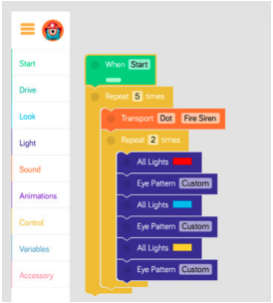
- Ask campers to look at this program and ask them to predict what Dash will do when they hit start. ((Sample response: “Dash will make a fire engine noise and then go through all the light patterns two times. Then the entire process will repeat 5 times.”)
- Instructor will play the program to see if the campers predictions were correct.
- Ask the campers, how many repeat blocks need to be used to create a Nested Loop? (2)

Campers will independently practice creating a Nested Loop- 20 minutes
- Campers will go to their simulator and clear their first program.
- Remind students that they are creating a Nested Loop and that their command blocks should be inside of 2 repeat blocks.
- Stress to the campers as they are adding to their programs they want to be testing what they have to ensure the program is doing what they want it to do.
- Instructors should be checking in with each camper individually to ensure they are successful.
- If a camper is struggling the instructors will ask them to share their screen and assist them in problem solving.
- Instructors will ask for a volunteer that wants to share their nested loop program with the class.
- Campers share by sharing their screen.

Day One Camper Independent Activity: 40 minutes
- Instructors will introduce the activity the campers will be working on.
- Instructors will share their screen.
- Campers will be participating in a Camp Circus.
- Campers will design a program using Nested Loops.
- As Dash is performing in the circus, he will be performing as a clown.
- Remember you need to “think” like a clown. Ask the campers: “What comes to mind when you think of clowns?”
- You need to include spirit as well as colors and sounds. Record your own voice talking to the crowd.
- Dash needs to engage the campers with a fun and creative routine.
- Make sure that your program has nested loops, since that is what our focus was today.
*Instructors will release campers to work independently.
- Instructors will check with each camper individually to ensure campers are working well and understand what they are supposed to be doing.
- If a camper is struggling ask the camper to share their screen so the instructor can help them solve the problem.
- Instructors will watch the time and ensure that there will be 45 minutes left for camper share as well as wrap up and instructions for the home challenge.
- Have campers save their program and name it “Nested Loop”

Wrap up activity: 45 minutes
Instructor to review appropriate behavior when campers are sharing.
- When we are sharing, we are only using positive words.
- Instructor gives an example: “John, I really liked how you were able to use all the color lights in your program.”
- We should feel good after someone comments on our work.
- Ask who would like to share their program with the group? (instructor selects who will share first)
- When all campers are done, have each group present their program to the class
- Introduce themselves
- Explain what Dash will be doing during the execution of the program that they wrote
- Show the class how Dash executes their program
- If there is time remaining, campers can continue with the puzzles from yesterday. Click the 3 orange lines in the upper left hand corner and select puzzles. Remind campers that you can monitor their progress while they are completing the puzzles.
Lunch: One Hour
Welcome campers back to the session: 5 minutes
- Discuss what campers did before lunch
- Chat about what campers have been up to during the hour away from the screen
Instructors review the Look, Sound, Animation and Control Folders: 10 minutes
- Instructors will remind campers off the different command blocks within these folders.
- Remember that we can record our own voice onto Dash within the Sound Folder.
- We can repeat commands several times when we use the Repeat Blocks.

Instructors Introduce the Repeat Until Loops: 15 minutes
- Instructors should share their screen and show this image:

- This is a Repeated Loop. Ask the campers to look at this program and predict what is going to happen.
- Instructors should explain that Dash is going to do what is inside the Repeat Until block- look left, look right, drive forward 10cm UNTIL there is an obstacle in front of him. Then he will do the final command of turn left 90.
- Answer any questions.
Independent Activity Practicing Repeated Loop: 30 minutes
- Introduce the activity they will be working on. “Today you are going to participate in a camp track and field activity. There are many running activities that Dash will have to complete if he wants to win a medal. You are going to create a program that shows Dash is running a race and every so often Dash runs into a roadblock. He has to move around the roadblocks so Dash will need to move right and left to get around. Remember you are using the Repeat Loop within your program. You should also be adding sound blocks and light changes to add to the fun of your program.
- If campers are done and others are still working those campers can start to complete the puzzles or they can add to their program.
- Make sure that the campers are testing their programs as they are building.
Instructor to Model using Multiple Loops: 10 minutes
- Instructor should share their screen to show this image:
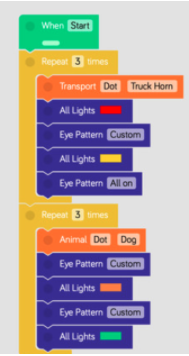
- Ask the campers, “ What do you predict Dash will do if he was following this program?”
- Listen to their responses.
- Let them know that Dash will be repeating multiple loops. First he will make a truck horn noise, then his lights will change to red, his eye pattern will change and then his lights will then change to yellow.
- Mention to the campers that they can also change the number of times the loop will repeat.
- Ask the campers if they have any questions about multiple loops.
- Remind campers that if they use a Repeat Forever block instead whatever they place inside the block will repeat and anything else after will not happen.
- Save your program as Repeated Loop
Independent Activity Practicing Multiple Loop: 20 minutes
- Have campers add to their existing program from the previous activity.
- They need to incorporate repeated loops.
- Remind the campers that they do not want to use the repeat forever command blocks.
- Encourage campers to add sound and animation as well as light colors to their program to make it more exciting.
- Instructors want to pay attention to the time to ensure campers will be able to share their programs.
Wrap up: 30 minutes
- Instructors will ask who would like to share their program with the group.
- Have campers share their screen when they are sharing.
- Remind all the campers about being positive when someone is sharing their work.
- After certain campers have shared their program, the instructor will go over the instructions for the home challenge.
Home Challenge Activity Directions
Day One-Bowling Home Challenge
Campers will participate in The Bowling Challenge with Dash. Using the simulator you will create a program in Blocky that enables Dash to complete the challenge. What an exciting and fun challenge. Who will be able to rise to this challenge? Campers will create a program in Blockly that includes the following:
Here is the grid you will need to follow when designing your program. There are bowling pins located at each lighter color side.
- Your goal is to create 1 program that will successfully knock down all of the bowling pins that are located on the light color lines.
- Dash will begin on the upper left hand corner of the grid.
- Make sure that as you are designing your program you have to grid handy to test if the blocks you are choosing will indeed knock down the specific placed pins.
- You should click start 1 time and your program will direct Dash to knock down all of the pins.

Make sure that when you have completed this challenge you save your work as Bowling. Tomorrow you will have the opportunity to share your program with the group. Remember if something is not looking right with your program, review the directions and problem solve while looking within your program. You may need to change a block or two in order for Dash to move the way you want him to. Good Luck!
Additional Home Activities: